Table of Contents
The best cloud data warehouse for most teams is Snowflake for SQL-heavy BI, BigQuery for ad-hoc and serverless analytics, Databricks for ML and data engineering, and Redshift for AWS-native teams wanting the lowest entry point. A cloud data warehouse is the central store where you consolidate data from every source to run analytics at scale, and the four leaders are close enough on capability that the decision usually comes down to workload fit and cost.
The truth that reframes the comparison: they are all consumption-priced, so your workload type, not a headline rate, decides the winner, and real migrations prove it swings both ways. GetYourGuide cut costs 20 percent moving Looker workloads to Databricks; SmarterX halved its bill moving from Snowflake to BigQuery; Travelpass cut compute 65 percent moving BI off Databricks onto Snowflake. Same category, opposite directions, because each platform is cheapest for a different workload. Matching the warehouse to your dominant workload is the entire game.
Every figure below is a recent observed rate. Because all four bill by consumption, your actual cost depends on your queries and data volume, so treat each as a planning reference.
Quick Comparison: Cloud Data Warehouses at a Glance
| Platform | Best For | Observed Price | Model |
|---|---|---|---|
| Snowflake | SQL-heavy BI, concurrency | ~$2 to $5 per credit | Credits (compute) |
| BigQuery | Ad-hoc, serverless analytics | $4.69/TB scanned (on-demand) | Per TB scanned |
| Databricks | ML + data engineering | ~$0.07 to $0.95 per DBU | DBU consumption |
| Amazon Redshift | AWS-native, low entry | Serverless from $1.50/hr (4 RPU) | RPU-hours / provisioned |
| Microsoft Fabric | Microsoft-centric analytics | Capacity-based | Capacity units |
What a Cloud Data Warehouse Does
A cloud data warehouse is the analytical database at the center of a modern data stack. You load data into it from your applications, SaaS tools, and event streams (via the ETL tools that feed it), then run SQL queries, BI dashboards, and increasingly ML workloads against a single consolidated store. Unlike a transactional database built for fast individual writes, a warehouse is optimized for scanning and aggregating huge volumes of data to answer analytical questions.
The defining architecture of the modern warehouse is the separation of storage and compute: you store data cheaply and spin up compute only when you query, paying for each independently. This is why they are consumption-priced and why the same platform can be cheap or expensive depending on how you use it. The AI layer now includes natural-language querying, automatic optimization, and native ML, blurring the line between warehouse and ML platform, especially with Databricks.
The warehouse is the foundation everything else in the data stack sits on. It is fed by the tools in our best AI ETL tools guide, queried by the platforms in our best AI business intelligence tools guide, and increasingly serves the ML workflows in our best MLOps platforms guide.
Your Workload Decides the Winner
Because all four warehouses are consumption-priced and close on raw capability, the cheapest one is entirely determined by your dominant workload, which is why documented migrations move in opposite directions. BigQuery’s per-terabyte-scanned model is cheapest for small, ad-hoc analytics where you scan little and query irregularly, paying nothing during quiet periods. Snowflake’s credit model wins for SQL-heavy BI with predictable, concurrent workloads. Databricks excels for ML and data engineering where Spark and notebooks are central. Redshift’s serverless floor is cheapest for AWS-native teams.
The pricing itself keeps shifting competitively. BigQuery’s on-demand rate is $6.25 per terabyte scanned, with the first terabyte each month free, and Redshift introduced a serverless tier from $1.50 an hour, quietly becoming the cheapest entry point. Snowflake runs $2 to $5 per credit and Databricks $0.07 to $0.95 per DBU. But the rates are close enough that your query pattern, not the sticker, determines your bill, so the honest advice is to model your actual workload rather than compare per-unit prices.
Best for SQL and BI Workloads
Snowflake is the strongest choice for SQL-heavy BI workloads with predictable concurrency, thanks to its mature engine, excellent zero-copy cloning, and ability to scale compute per workload without contention, priced at roughly $2 to $5 per credit. Its architecture handles many concurrent BI users cleanly, and its ease of use and cross-cloud availability made it the default for organizations centered on SQL analytics. Travelpass’s 65 percent compute cut moving BI onto Snowflake illustrates its strength for this exact workload. For teams whose warehouse is primarily a BI and SQL-analytics engine, Snowflake is the safe, capable default.
Microsoft Fabric is the natural pick for Microsoft-centric organizations, unifying data warehousing with the broader Microsoft analytics and Power BI ecosystem on a capacity-based model. For teams already invested in Microsoft and Power BI, Fabric keeps the warehouse in the same stack, reducing integration friction. Both suit SQL-and-BI-first organizations; Snowflake for cross-cloud flexibility and concurrency, Fabric for Microsoft-ecosystem consolidation. They pair directly with the BI tools in our best AI business intelligence tools guide.
Best for Ad-Hoc and Serverless
BigQuery is almost always cheapest for small and ad-hoc analytics, because its serverless, pay-per-terabyte-scanned model charges nothing during quiet periods and requires no capacity to provision, with on-demand queries at $6.25 per terabyte scanned after the first free terabyte each month. For teams that scan modest data volumes and query irregularly, without the sustained load to justify reserved compute, BigQuery’s model means small workloads often cost just $200 to $800 a month. SmarterX halving its bill by moving from Snowflake to BigQuery shows the savings for the right workload. It is the default when your usage is spiky, exploratory, or low-volume.
BigQuery’s fully-managed, serverless nature also removes operational overhead, no clusters to size, no capacity to plan, which suits lean teams and those on Google Cloud. The caveat is that the per-scan model can become expensive for heavy, repeated large scans, where reserved capacity or a credit-based warehouse may win, so it favors ad-hoc over sustained heavy querying. For teams whose analytics are bursty and Google-Cloud-aligned, BigQuery is the value leader.
Best for ML and Data Engineering
Databricks is the best choice for machine learning and data engineering, built on Spark with native notebooks and MLflow, making it the natural home for teams whose workload is data science and pipelines rather than pure SQL BI, priced by DBU consumption from $0.07 to $0.95. Its lakehouse architecture unifies data warehousing and ML on one platform, so data engineers and data scientists work in the same environment. GetYourGuide’s 20 percent cost cut moving Looker workloads to Databricks reflects its strength for data-heavy, ML-oriented use. For organizations where ML and engineering pipelines dominate, Databricks is purpose-built.
The caveat is cost discipline: DBU consumption escalates without active management, so Databricks rewards teams with FinOps practices, and Travelpass’s experience shows that pure BI workloads can be cheaper elsewhere. Amazon Redshift is the pragmatic default for AWS-native teams, with its new serverless tier from $1.50 an hour and zero-ETL integration with Aurora and S3 making it the low-friction choice inside AWS. Choose Databricks when ML and engineering lead, Redshift when AWS-nativity and a low entry point matter, feeding the workflows in our best MLOps platforms guide.
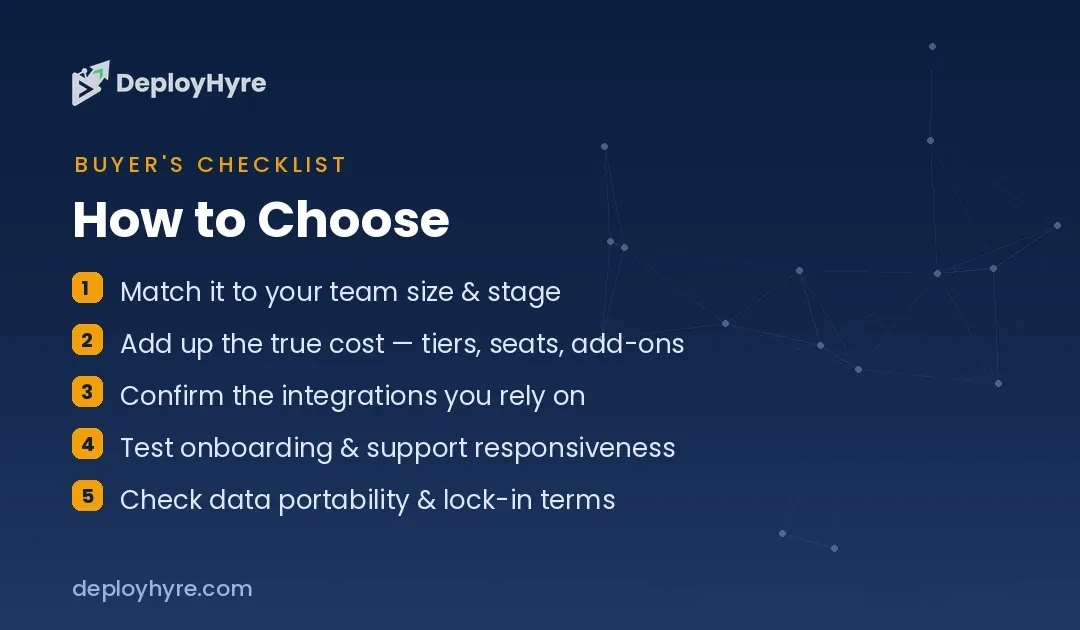
How Should You Choose a Cloud Data Warehouse?
Identify your dominant workload first, because it, not the per-unit price, decides the cheapest platform. SQL-heavy BI with steady concurrency points to Snowflake. Ad-hoc, spiky, low-volume analytics point to BigQuery. ML and data engineering point to Databricks. AWS-native workloads point to Redshift. This match matters more than any rate comparison.
Then weigh your cloud and ecosystem. Google Cloud teams lean BigQuery, AWS teams lean Redshift, Microsoft teams lean Fabric, and Snowflake and Databricks run cross-cloud. Existing cloud commitments bring data gravity and negotiated discounts that often tip the decision, so factor them in alongside workload fit.
Finally, model your real consumption, because these are all usage-priced and the documented migrations prove costs swing 20 to 65 percent in both directions depending on workload. Run a proof-of-concept with your actual queries and data volumes rather than trusting per-unit rates, and build in FinOps discipline for the consumption model you choose, especially with Databricks DBUs.
How We Evaluated These Platforms
We evaluated each platform on query performance, workload fit (BI, ad-hoc, ML), ecosystem integration, AI and native-ML capabilities, and consumption pricing. Figures come from vendor pricing and documented cost comparisons. Because all four are consumption-priced and the cheapest depends on workload, we present observed rates and real migration outcomes rather than a single ranking. Rankings reflect fit for a stated use case.
The Bottom Line
Snowflake wins for SQL-heavy BI and concurrency, BigQuery for ad-hoc and serverless analytics, Databricks for ML and data engineering, and Redshift for AWS-native teams wanting the lowest entry, with Microsoft Fabric the Microsoft-ecosystem pick. Because all are consumption-priced and real migrations swing costs 20 to 65 percent in both directions, match the warehouse to your dominant workload and prove it with your actual queries before committing.
Frequently Asked Questions
How much does a cloud data warehouse cost?
All are consumption-priced. Snowflake is $2 to $5 per credit, Databricks $0.07 to $0.95 per DBU, and BigQuery $6.25 per terabyte scanned on-demand (first terabyte free each month). Redshift serverless starts at $1.50 an hour. Small ad-hoc workloads on BigQuery can run $200 to $800 a month, while large sustained workloads reach far higher, so cost depends entirely on your usage.
Which data warehouse is cheapest?
It depends on your workload. BigQuery is usually cheapest for small, ad-hoc analytics; Snowflake for SQL-heavy BI with steady concurrency; Databricks for ML and engineering; and Redshift’s serverless tier from $1.50 an hour for AWS-native teams. Documented migrations show costs dropping 20 to 65 percent in both directions between these platforms depending on the workload.
What is the difference between Snowflake and Databricks?
Snowflake is optimized for SQL analytics and BI with excellent concurrency and ease of use. Databricks is built on Spark for machine learning and data engineering, with native notebooks and MLflow in a lakehouse architecture. Choose Snowflake for SQL-heavy BI, Databricks for ML and pipelines, though both increasingly overlap.
Should I choose the data warehouse that matches my cloud?
Often yes. Google Cloud teams get integration and data gravity from BigQuery, AWS teams from Redshift, and Microsoft teams from Fabric, plus negotiated discounts on your existing cloud. Snowflake and Databricks run cross-cloud for teams that want independence. Weigh this alongside workload fit, since both matter.
Why do warehouse migration costs vary so much?
Because each platform is cheapest for a different workload and all are consumption-priced. A team moving a workload the destination handles efficiently saves money; a team moving one it handles poorly pays more. Documented examples show 20 to 65 percent swings in both directions, which is why you should model your actual queries rather than trust headline rates.
Related Articles


The DeployHyre Editorial Team writes buyer guides on AI tools, SaaS, cloud hosting and proxies. We compare tools using published pricing, official documentation and third-party reviews. All content is for educational and informational purposes only.